

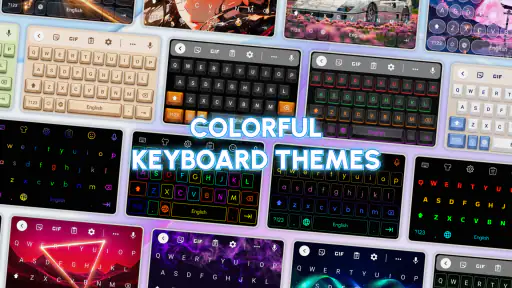
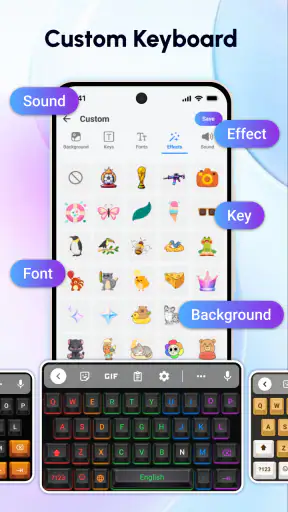
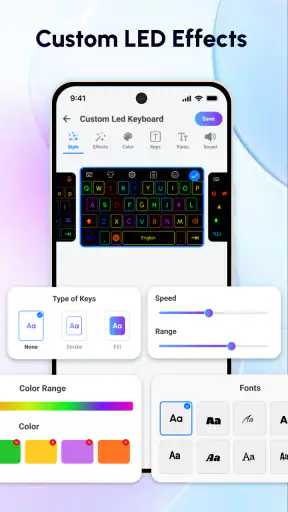
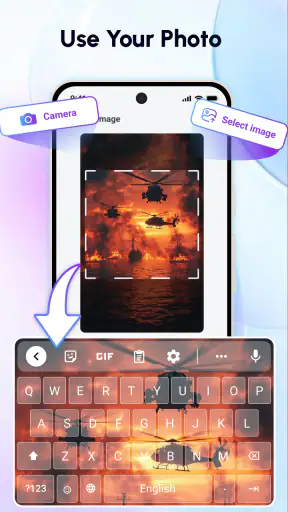
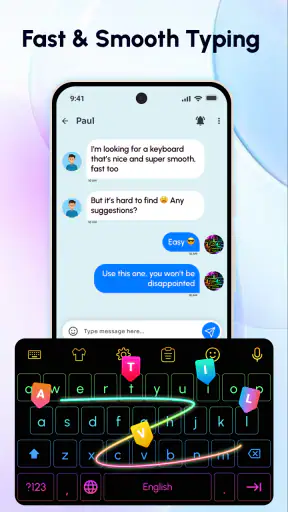
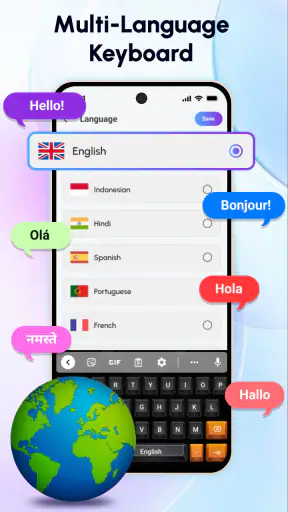
I spend a surprising amount of time looking at my keyboard, especially when I am replying to messages, searching for something, or writing on a phone for more than a few minutes. Mechanical Keyboard: RGB Theme turns that otherwise ordinary part of the screen into the main visual feature. It is a free personalization app from Neli Creative that focuses on mechanical-style keyboard themes, colorful RGB effects, and typing sounds designed to feel more physical.
After using it, my impression is that this is less about transforming the way I type and more about changing how typing feels and looks. The keyboard remains a practical input tool, but the lighting and sound can make routine messages feel more lively. That distinction matters: if you want faster typing, a new layout, or advanced writing tools, this is probably not the right type of app. If you want your on-screen keyboard to have a stronger identity, it has a clearer purpose.
The app sits in the personalization category, carries an Everyone age rating, and is free to install. Its current version is 1.8.1, and it runs on Android 9 or later. Neli Creative has built something aimed at people who enjoy the look and atmosphere of gaming hardware without necessarily owning a physical RGB keyboard.
How the keyboard feels during everyday typing
The first thing I noticed was not raw speed but the change in feedback. A standard phone keyboard can feel visually flat and quiet. With this app, the colored theme gives each typing session more presence, while the realistic mechanical-style sounds add a small response after each tap. That can make short interactions feel more deliberate, particularly when I am writing a message rather than entering a quick search.
It is important not to confuse visual or audio feedback with improved input performance. Mechanical Keyboard: RGB Theme does not make my fingers move faster by itself. My typing speed still depends on the phone, the keyboard layout, touch accuracy, and my own habits. The app’s contribution is perceived responsiveness: each tap can feel more noticeable because there is an immediate visual and sound cue.
For a quick message, that extra feedback is enjoyable. I can see why someone who likes gaming aesthetics would prefer it over a plain keyboard. The RGB presentation gives the bottom portion of the screen a more customized look, and the sound helps create the impression of pressing physical switches. I found that most useful when I was typing casually, not when I was trying to write quickly or discreetly.
There is also a practical trade-off here. More feedback is not always better feedback. If I am entering a password, typing in a quiet room, or concentrating on a long note, sound effects can become distracting. The visual theme may remain pleasant, but the audio side needs to fit the situation. I would treat the sound as an optional mood feature rather than something I would leave active all day.
A realistic morning-to-evening example
Imagine starting the day by replying to a group chat while waiting for coffee. A colorful keyboard and light mechanical clicks make that small task feel more personal than the default layout. Later, you might use the phone to search for an address, answer a work message, and write a longer shopping list. In those situations, the theme stays useful as a visual customization, but the sound becomes more dependent on where you are.
At work or in a library, I would lower the phone volume or avoid the sound effects altogether. On a commute or at home, the audible response may be more enjoyable. This is one of the app’s less obvious decisions: the best experience changes with context. It is not simply a case of turning every effect to maximum and forgetting about it.
Another useful habit is to judge the theme while looking at the keyboard in both bright and dim surroundings. Strong RGB colors can look attractive in a dark room but may feel visually busy in daylight. If you type frequently, a theme that remains readable is more valuable than one that is merely dramatic in a screenshot.
What happens during heavier use
Longer typing sessions are where expectations should stay realistic. The app is designed around the keyboard’s appearance and feedback, not around becoming a complete writing environment. When I am drafting several paragraphs, the main question is whether the theme helps me stay comfortable or starts competing for attention.
The RGB effects can make the interface feel active, but they do not replace the basics of a good keyboard. Autocorrection, word suggestions, cursor control, language support, and touch accuracy still determine how pleasant long writing will be. Anyone who writes documents on a phone should compare this experience with the device’s usual keyboard rather than assuming that a more striking design automatically means a better writing tool.
For short bursts, the app’s focus works in its favor. A quick reply, a game-related message, or a social post benefits from a distinct visual style without requiring much commitment. For long notes, I would pay more attention to whether the effects remain comfortable over time. The stronger the animation or sound feels, the more likely I am to reduce stimulation when concentrating.
This makes the app particularly suitable for people who already like customizing their phone. It can complement a themed home screen, gaming wallpaper, or dark interface. It is less compelling for someone who sees the keyboard as a purely functional area and wants the fewest possible distractions while typing.
Stability and recovery in normal use
The app’s popularity gives it a useful level of reassurance: it has passed one million installs and holds an average rating of 4.5 from about 5.9 thousand ratings. Those figures suggest that the basic idea works for a substantial audience, although they do not guarantee that every phone will behave identically. Keyboard-related apps interact closely with the device and the way text input is configured, so personal experience can vary.
In practical terms, I would approach setup with a little patience. A keyboard theme is not the same as a wallpaper because it has to appear where text entry happens. If the visual style does not show immediately, the sensible recovery process is to revisit the keyboard selection and customization steps, then test it in a simple text field. Restarting the app or returning to the default keyboard can also help isolate whether the issue is with the theme or with the phone’s current input setup.
This is a good reason to keep expectations measured. A personalization keyboard is more dependent on system configuration than a standalone wallpaper app. If you switch frequently between keyboards, use several languages, or rely on specialized input tools, you may need to check that the experience still fits your routine after changing the theme.
I also recommend testing the keyboard before making it your only option. Keep the familiar keyboard available until you are sure the new appearance and behavior suit you. That is not a criticism unique to this app; it is simply sensible recovery planning for any app that affects text entry. If an update or device change makes the experience inconvenient, returning to a known keyboard should be straightforward.
Resource expectations and the cost of visual effects
Mechanical Keyboard: RGB Theme is free, which makes trying it relatively easy. The app includes in-app purchases ranging from $3.99 to $24.99 per item, so I would explore the free experience first and decide whether the extra customization is genuinely useful before spending anything. The important question is not only the price but whether you will keep using the theme after the novelty wears off.
RGB effects and typing sounds are the parts most likely to influence how demanding the experience feels. I would not assume that a colorful effect is cost-free on every device, particularly on an older phone or during a long session. The app’s minimum requirement is Android 9, but meeting that requirement does not mean every device has the same display, battery condition, memory, or overall responsiveness.
A practical way to judge it is to use the keyboard during your normal routine rather than testing it for only a minute. Send several messages, switch between apps, and type in the places where you usually use your phone. Watch for changes in comfort, responsiveness, or battery habits without treating a single session as proof of a universal result. If the effects feel unnecessary, reducing the visual intensity or disabling sound is the first adjustment I would try.
This also explains why the app may appeal more to a newer or well-maintained phone than to an aging device already struggling with multiple background tasks. The keyboard itself is only one part of the experience, and the phone’s existing workload matters. I would skip the more elaborate presentation if my device is already short on storage, battery life, or smoothness, even though the app officially supports Android 9 and newer.
Who will enjoy it, and who should pass
I would recommend it to someone who wants a more expressive keyboard without buying physical hardware. It is a good fit for users who enjoy RGB lighting, gaming-inspired visuals, and tactile-style sounds. It also makes sense for teenagers and casual users who want their phone to feel less generic, provided the sound and visual effects are used appropriately in shared spaces.
The app is less suitable for people who need a keyboard primarily for accessibility, professional writing, multilingual work, or highly controlled productivity. In those cases, layout options, prediction quality, language tools, and dependable text editing may matter more than appearance. A conventional keyboard with mature writing features could be the better choice.
I would also hesitate to recommend it to anyone who dislikes audible key feedback. Even a realistic sound that seems fun at first can become irritating when repeated across hundreds of taps. The same applies to users who prefer a minimal interface. A plain keyboard may be less exciting, but it can keep attention on the message rather than on the keyboard itself.
There is a middle ground for people who like the look but not the constant stimulation. Use the theme as a visual change while keeping sound low or off when you need concentration. That approach preserves the app’s main personality without allowing the effects to control every typing session.
How it compares with ordinary keyboard choices
The usual default keyboard is generally the safer all-round option because it is already integrated into the phone and familiar from the first day. It may offer a quieter, simpler experience and can be preferable when reliability and writing tools come first. Mechanical Keyboard: RGB Theme competes on personality rather than on being a complete replacement for every keyboard function.
Wallpaper apps create a similar sense of personalization, but they do not change the typing moment itself. This app reaches a part of the interface you use repeatedly, so the customization feels more immediate. On the other hand, a wallpaper is less intrusive and does not introduce typing sounds or a keyboard configuration step.
Physical mechanical keyboards remain in another category entirely. They provide real switch movement and can be better for people who type extensively at a desk. This app offers an imitation of that atmosphere on a phone, not the same hardware sensation. That makes it a convenient visual alternative, but not a substitute for genuine key travel or a desktop writing setup.
Compared with a productivity-focused keyboard, the difference is even clearer. A productivity keyboard should win when advanced text entry is the priority. Mechanical Keyboard: RGB Theme wins when the goal is to make mobile typing look and sound more distinctive. Choosing between them depends on whether you want efficiency tools or a stronger sense of style.
Small adjustments that improve the experience
My first tip is to separate visual enjoyment from audible feedback. Try the theme with sound for casual use, then turn sound down or off before using it in public. This avoids the common mistake of judging the whole app by one setting that may not suit every environment.
My second tip is to test readability before choosing a dramatic RGB presentation. A bright color combination can look impressive but make keys or labels harder to distinguish. If you need to glance down often, clarity should come before visual intensity. The most attractive theme is not necessarily the one that causes the fewest typing errors.
Third, use the app alongside your established keyboard for a short transition period. That gives you a fallback if the new setup feels awkward and lets you compare actual typing rather than relying on first impressions. Pay attention to whether you enjoy the keyboard after several ordinary tasks, not just after opening it for the first time.
Finally, consider the purchase carefully. Since the app is free to start and optional items can cost from $3.99 to $24.99, I would only pay for additions that solve a specific preference, such as a theme you will genuinely keep using. Collecting visual options can be tempting, but more themes do not automatically make typing more comfortable.
My performance verdict
Mechanical Keyboard: RGB Theme succeeds when judged as a focused personalization app. Its strongest quality is the way it changes the mood of typing through RGB styling and mechanical-inspired sound. It makes short, casual interactions more engaging and gives users who enjoy gaming aesthetics a way to carry that taste onto their phone.
Its limitations are just as clear. It does not turn a phone into a physical keyboard, and it should not be chosen in place of a mature productivity keyboard when writing tools are the main concern. The effects may also be too distracting for quiet environments or long concentration-heavy sessions, while older devices may deserve more cautious testing.
With over one million installs and a 4.5 average rating, the app has found a sizeable audience, but the right decision still depends on your habits. I would install it if I wanted a more colorful, tactile-feeling keyboard and was comfortable adjusting the sound and effects to the situation. I would skip it if I wanted the fastest path to reliable, distraction-free writing.
Overall, Mechanical Keyboard: RGB Theme is a fun visual upgrade rather than a productivity breakthrough. I recommend trying the free version, testing it in real daily situations, and keeping your usual keyboard available until the novelty proves useful. For the right user, that is enough: the phone feels more personal every time a message is typed, without pretending that style can replace the fundamentals of good text input.


